
The Assette Data Block Editor extension for Visual Studio Code provides a development environment for creating, editing, and managing Assette Data Blocks. To ensure secure and reliable communication with the Assette platform, the extension includes several configurable settings. These settings define how the extension connects to Assette APIs, how uploaded blocks behave, and how authentication is completed.
This article describes each available setting in detail and explains how they should be configured for use within your environment. All configuration is performed within the Visual Studio Code Settings interface, either at the User or Workspace level, depending on your organization’s development practices.
Accessing Extension Settings #
To modify the settings, open Visual Studio Code.
Navigate to File > Preferences > Settings (or Code > Settings on macOS).
In the search bar, enter @ext:AssetteLLC.blockeditor to filter the settings for the Assette Data Block Editor.
All available configuration fields for the extension will appear under the User or Workspace tab.
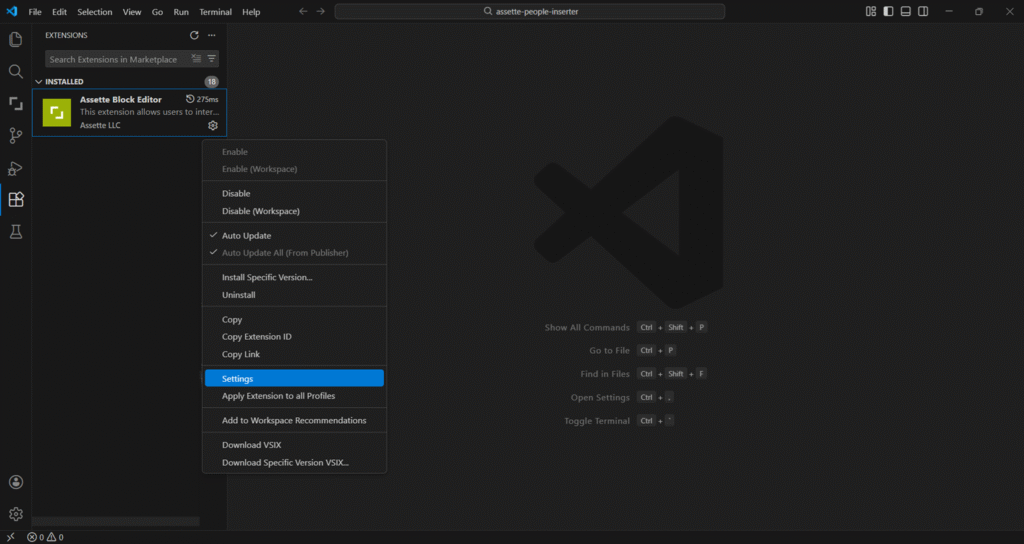
Alternatively, open the extensions panel and click on the gear icon and select “Settings” from the dropdown menu.
Settings Overview #
Assette Extension: API Base URL #
This field specifies the primary base URL of the Assette API. The extension uses this endpoint for all standard Data Block interactions.
The value must be the production API endpoint provided by Assette.
https://api.assette.comIt is critical that this URL precisely matches the environment you intend to work within, as mismatches may prevent authentication or block retrieval. This setting does not need to be updated or changed to access different tenants
Assette Extension: Common API Base URL #
This setting defines the endpoint for common API operations used by the extension. These operations include shared capabilities across multiple Assette services and editor functions.
Expected Value:
https://api.assette.com/vscode-common/v1Developers should not modify this field unless instructed by Assette Support or your internal technical team.
Assette Extension: Publish Blocks on Upload #
This setting controls whether a Data Block is automatically published immediately after it is uploaded to Assette from within VS Code.
The available values are:
Yes – The extension will upload and immediately publish the block.
No – The extension will upload the block only; publishing must be completed separately within the Developer Center.
Most organizations prefer No, ensuring that publication follows their internal review and approval workflow. This setting will respect any workflows set up within the tenant.
Assette Extension: Redirect URI #
The Redirect URI is used during the authentication process when the extension requests tokens from the identity provider used by your Assette environment.
The value must match the redirect URI registered for the extension in your identity configuration. A common local development example looks like:
http://localhost:3000Your implementation may differ depending on your Single Sign-On configuration and network policies. If authentication does not complete successfully, this field should be validated first.
Assette Extension: Return Token Key #
This setting specifies which token returned by the identity provider should be used by the extension after successful authentication.
The default value is:
id_tokenThis parameter instructs the extension to extract and use the identity token for authorized API communication. In most environments, this field should not be modified unless your identity provider uses a non-standard token structure or your internal SSO configuration requires an alternative token type.